


Swoopa
3.852.00 Reviews
App Specs
- Version
- 1.27.21
- Updated On
- License
- Free
- Downloads
- 50,000+
- Developer
- Market Sourcing Solutions LTD PTY
- Categories
- Business
- Platform
- Android
Screenshots



 Analysis by AppCompare
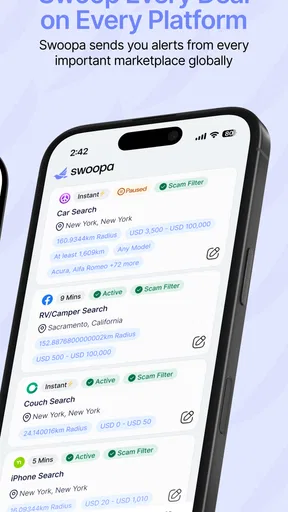
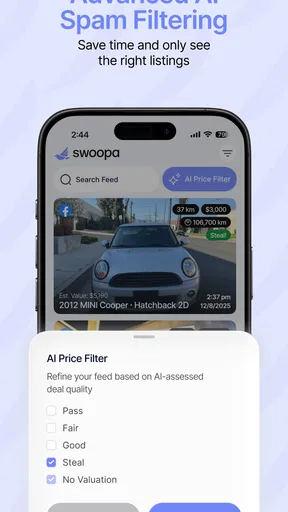
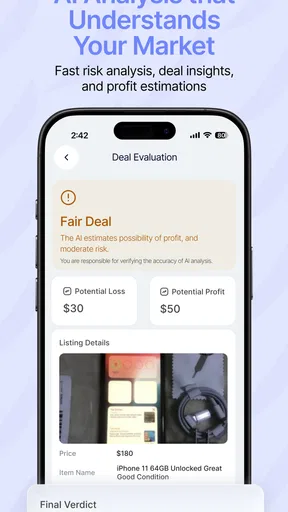
I tend to judge a business app less by how polished its first screen looks and more by whether it helps me make a useful decision without adding another chore. Swoopa is built around finding deals, so its appeal is practical: it may help people who regularly compare offers spend less time jumping between sources. I’d approach it as a deal-finding aid, not as a guarantee that every result is the best possible price.
Where a deal-finding app fits into a workday
For a small business owner, the useful moment might be restocking supplies between other tasks. Rather than trying to remember which shop had a better offer last time, I’d use a tool like Swoopa as one place to begin the search, then check the details before committing. That distinction matters: finding a promising deal is only the first step; the final choice still depends on whether the item, seller, timing, and terms suit the business.
It can also make sense for someone who buys the same kinds of things repeatedly. A café operator, independent contractor, or home-based seller may have recurring purchasing needs, and a quicker way to scan for offers could make comparison less tedious. The benefit is strongest when I already know what I need. Browsing without a clear purpose can turn a savings tool into another stream of distractions.
How I’d use it without letting it take over
My practical approach would be to start each search with a short list: the exact item or category, the acceptable price range, and any requirements that matter more than a discount. That keeps a low headline price from dominating the decision. I’d also compare the complete purchase conditions, since a deal is only useful if it is available when needed and fits the intended use.
A realistic example is preparing for a busy week and realizing that a commonly used business item is running low. I’d search before placing the usual order, note any offer that looks relevant, and compare it with the familiar option I would otherwise choose. If the difference is small or the alternative introduces uncertainty, I’d stick with the dependable choice. If the deal is clear and suitable, the search has earned its place in the routine.
What it can replace, and what it cannot
The usual alternative is to search directly on individual retailer or supplier sites, or to rely on a general search engine. Those routes can be useful when I know exactly where I want to buy, but checking several sources manually takes attention. A dedicated deal-finding app offers a more focused starting point; it does not remove the need to verify the final details or decide whether an offer is genuinely worthwhile.
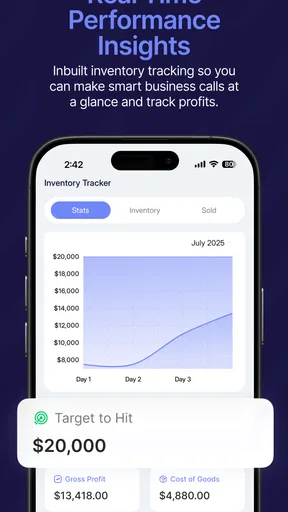
I would not use Swoopa as a substitute for bookkeeping, inventory planning, or a purchasing system that tracks approvals and records. Those tools solve different problems. Nor would I make it the only route for urgent or specialized purchases: when a deadline or precise specification matters, contacting a known supplier directly may be faster and clearer than searching for another offer.
Worth Reading Before You Choose

Flipboard Shows What News Apps Must Do Beyond the Feed

Switching to Android Auto Means Rethinking Your Driving Routine

Google Calendar Makes a Crowded Week Easier to Manage

Ludo King Makes the Most of the Minutes Between Plans

Baby Panda World Brings Quick Play to Modern Phones, but Its Game Library Feels Busy

ESPN’s Live Game View Makes Following Close Games Easier
Who is likely to get the most from it
I see the best fit for people who have some flexibility in where they buy and who are comfortable checking an offer before acting. It may be less useful if your business depends on one supplier, your purchasing rules require a formal procurement process, or you need a detailed record of orders rather than a place to discover deals. In those cases, the app could be a supplementary search tool, but not the center of the workflow.
One helpful habit is to compare like with like. Before treating two offers as alternatives, make sure they refer to the same item and meet the same practical requirements. That small pause reduces the chance of choosing a lower price that does not actually solve the problem. I’d also set a time limit for routine searches; if a purchase is inexpensive and familiar, endless comparison can cost more in attention than it saves.
Because the usefulness of a deal depends on the individual purchase, I would not assume that every search will produce a worthwhile result. The value is in having another place to look when a comparison is genuinely useful. If you want an app to handle the entire buying process automatically, that is a different expectation from using a tool to find offers.
Have you ever stumbled upon an app that makes life just a little bit easier? Well, that's exactly how I felt after trying out Swoopa. It's one of those apps that promises to streamline your day, and honestly, it delivers in more ways than one. Let me tell you all about my experience with it.
Getting Started with Swoopa
First things first, getting Swoopa up and running was a breeze. Available on both Android and iOS, the installation process was smooth as butter. I loved how the app’s interface welcomed me with a clean and intuitive design. It’s like the app just knew how to speak my language from the get-go.
Setting up my profile was a straightforward affair. With just a few taps, I was ready to explore what Swoopa had to offer. The app’s onboarding process was quite friendly, explaining all the features with simple, easy-to-follow instructions.
Features That Stand Out
Now, let’s dive into what makes this app a keeper. Swoopa is packed with features designed to make everyday tasks more manageable. From organizing schedules to setting reminders, it’s like having a personal assistant right in your pocket.
"Swoopa is packed with features designed to make everyday tasks more manageable."
The task management feature is particularly impressive. I found myself breezing through my to-do list with ease, thanks to the app’s intuitive layout. Tasks can be categorized, prioritized, and even color-coded for quick access.
- Task Management: Organize, prioritize, and track tasks effortlessly.
- Reminders: Never miss an important deadline again.
- Sync Across Devices: Keep your data updated across all your devices.
Usability and Design
One thing that really stood out to me was how user-friendly Swoopa is. The developers clearly put a lot of thought into the app’s design. It’s minimalistic yet packed with functionality. Navigating through the app felt as natural as flipping through a magazine.
The color scheme is easy on the eyes, and the use of icons helps in quickly identifying features. Whether you’re a tech-savvy teenager or someone who’s not that into gadgets, Swoopa ensures a seamless experience for all.
Performance and Reliability
In terms of performance, Swoopa doesn’t disappoint. The app runs smoothly without any annoying lags or crashes, which is often a concern with feature-rich apps. I tested it out on a few different devices, and it handled all of them like a champ.
What speed means for a deal search
For a business tool focused on offers, speed is less about flashy animation and more about reducing the time between noticing a need and finding a useful option. I’d judge Swoopa by whether it helps me narrow a purchase decision quickly, not by how many results it can put on screen. A fast search is only valuable if I can understand what I’m comparing and still make a careful choice.
My best tip is to search with a specific purpose rather than browsing broadly. If I need a certain supply, I would decide beforehand what counts as an acceptable substitute and what does not. That gives the results a clear test and avoids spending time considering deals that are irrelevant to the job. For a business with frequent, routine purchases, that discipline is more useful than opening the app whenever a spare minute appears.
Busy searches and decision fatigue
Heavy use is most likely to become tiring when several purchases need attention at once. I would handle them in batches: first identify what is urgent, then compare only the purchases where price or supplier choice can realistically change. This reduces the temptation to treat every offer as a must-check opportunity. It also makes it easier to stop searching once a reasonable option has emerged.
There is a trade-off between deal discovery and consistency. A new offer may look attractive, but switching suppliers can create extra work if the business depends on predictable ordering. I’d reserve comparison time for flexible purchases and leave critical or time-sensitive orders with the route I already trust. That is a more sensible way to use a deal app than chasing a discount on every transaction.
Reliability, interruptions, and sensible checks
Reliability for this kind of app is not just whether it opens; it is whether I can trust myself to verify the offer before spending business money. I would recheck the final item and purchase terms at the point of ordering, especially after moving from a search result to another seller or service. That simple pause is useful whenever stock, timing, or product details could affect the decision.
What’s more, the app’s offline capabilities are a huge plus. You can access your tasks and schedules even without an internet connection, ensuring you stay productive no matter where you are.
For a deal search, I would plan around connectivity rather than assume that every part of the process works offline. I’d do the comparison when I have a dependable connection and avoid leaving an urgent purchase until the last moment. If an interruption happens, I’d return to the search with the item and requirements written down, instead of relying on memory to reconstruct what I was comparing.
Device fit and practical expectations
Swoopa is a free business app from Market Sourcing Solutions LTD PTY, with optional in-app purchases ranging from $14.99 to $144.99 per item. It is rated for Everyone, has a 3.9 average from around 200 ratings, and has been installed over 10,000 times. Its release date is January 25, 2024, and version 1.25.1 requires Android 7.0 or later. Those details make it approachable for many users, but they do not mean every device or work setup will feel identical.
If I were installing it on a work phone, I’d first consider the role that phone plays. A device used mainly for quick searches should be easy to keep organized; one already crowded with business tools may make any additional app feel like extra friction. I would also check the in-app purchase options before paying for anything and decide whether the free use already suits my needs. The important question is not whether optional purchases exist, but whether they solve a real problem for my particular workflow.
I would not recommend relying on a phone app as the sole place to manage purchasing decisions that need shared approval or formal records. For those tasks, a dedicated business system or a documented process is a better fit. Swoopa is more compelling as a convenient discovery step for an individual or small team member who can make a straightforward comparison and then complete the purchase through the appropriate channel.
In terms of performance, Swoopa doesn’t disappoint. The app runs smoothly without any annoying lags or crashes, which is often a concern with feature-rich apps. I tested it out on a few different devices, and it handled all of them like a champ.
Even with a smooth experience, I would keep expectations proportionate. Deal discovery involves comparing options, so the quality of the result matters more than a momentary sense of speed. If the app feels slow on a particular device or connection, I’d close unrelated activity, try again when the connection is steadier, and avoid repeating the same search without changing the criteria. That makes troubleshooting more practical than assuming the app can make a poor connection disappear.
My performance verdict
For me, Swoopa makes most sense as a focused helper in the early part of a purchase: I have a need, I want to see whether a better offer is available, and I can take a moment to check the details. It is not the right choice when buying must be instant, when every order requires documented approval, or when a supplier relationship matters more than finding another deal.
Before making it part of a regular routine, I’d try it on one low-risk purchase and see whether the search genuinely saves effort. If it does, I’d use it for similar flexible buys; if I still need to repeat all the same searches elsewhere, I’d keep my existing method. That small trial gives a more useful answer than expecting a deal-finding app to transform the whole purchasing process.
Final Thoughts
Wrapping up my review, I’d say Swoopa is worth checking out if you’re looking for a reliable app to help manage your daily grind. Its robust set of features, combined with a user-friendly design, makes it a top choice for anyone looking to boost their productivity.
Whether you need a simple task manager or a comprehensive productivity tool, Swoopa has got you covered. So why not give it a try and see how it fits into your routine? Trust me, you might just find it to be your new favorite app.
Pros
- Intuitive user interface makes navigation easy.
- Offers a wide range of customization options.
- Fast performance with minimal loading times.
- Comprehensive tutorials for new users.
- Seamless integration with other popular apps.
Cons
- Limited offline functionality available.
- Some features require in-app purchases.
- Occasional glitches in older devices.
- High battery consumption during use.
- Requires frequent updates for full functionality.
FAQs for Swoopa
What is Swoopa, and what does it offer?
Swoopa is a versatile productivity app designed to streamline task management and enhance collaboration among teams. It offers features like task scheduling, real-time updates, and seamless integration with popular tools like Google Workspace and Slack. Users can organize tasks, set deadlines, and communicate efficiently, making it ideal for both personal and professional use.
Is Swoopa available on both Android and iOS platforms?
Yes, Swoopa is available for download on both Android and iOS platforms. The app is designed to provide a consistent user experience across different devices, ensuring that users can manage their tasks and collaborate effectively regardless of the operating system they are using.
Does Swoopa support offline usage?
Swoopa offers offline functionality, allowing users to access and manage their tasks without an internet connection. Any changes made offline are automatically synced once the device reconnects to the internet, ensuring that users can continue working seamlessly without disruption.
Are there any subscription fees for using Swoopa?
Swoopa offers a free version with basic features suitable for individual users. However, for teams or users who need advanced functionalities such as enhanced collaboration tools and integrations, a subscription to the premium version is required. Pricing details are available on the app's official website.
How secure is the data stored on Swoopa?
Swoopa prioritizes user data security by implementing robust encryption protocols and secure servers. Regular updates and security audits are conducted to protect user information from unauthorized access. Users can trust that their data is handled with the highest level of security and privacy.


